My Card Wallet
- 4.7
- Rating
- 1.00M
- Installs
- Free
- Price
 Analysis by App-foxy
I use prepaid cards differently from bank cards: one may be for a planned purchase, another may be a gift, and a third may be kept for online spending. That is where My Card Wallet makes sense. It is a free finance app from Blackhawk Network that brings prepaid-card management and mobile-wallet access into one place, rather than leaving me to search through emails, packaging, or separate wallet screens.
My first impression is that this is a focused utility, not a replacement for a full banking app. It is designed around prepaid cards and the practical question of how to keep them available when I need them. The app has been available since March 7, 2018, and its current release is 7.1.0.g. That history matters because this is not a brand-new experiment; it has had time to become a familiar tool for people who regularly use prepaid products.
The app is free and rated for Everyone, which makes its purpose easy to understand for a broad audience. It has reached over a million installs, with a 4.6 average from around eleven thousand ratings. Those figures suggest that the basic idea is useful to many people, although they do not remove the need to consider whether prepaid-card management is actually what you need.
You May Also Like

 Blood Strike: 2.5 Anniversary
Blood Strike’s Loadouts Turn Every Drop Into a Tactical Gamble
A close look at Blood Strike’s custom loadouts: how fast access to signature weapons reshapes its battle royale rhythm, rewards preparation, and narrows the gap between fights.

 Pandora - Music & Podcasts
Pandora’s Music Is Easy to Start, but Harder to Recover
Pandora’s strength is its low-effort path from a seed to a station. Its weak spot is how much confidence it asks you to place in connection, setup, and quiet recovery.

 8 Ball Pool
 Is Built on Rivalries, Rematches, and Routine
A close look at the rivalries, rematches, shared routines, and unanswered safety questions that turn a quick pool match into a persistent mobile community.

 Samsung Music
’s Quiet Strength Is Playing What You Already Own
Its reach comes less from spectacle than from dependable access to a personal library. That simplicity is both the app’s strongest retention engine and its ceiling.

 AccuWeather: Weather Radar
AccuWeather Review: A Quick, Clear Forecast for Everyday Decisions
For everyday plans, the best forecast is the one you can understand quickly. AccuWeather makes rain timing, radar, and local conditions easy to act on, with a few trade-offs.

 Hill Climb Racing
Why Hill Climb Racing Still Turns Crashes Into One More Run
A tiny car, a bumpy hill and one more upgrade: Hill Climb Racing keeps resurfacing because its simple chaos makes every near-miss feel personal.
More From Our News Desk



How My Card Wallet feels in everyday use
I find the everyday appeal of My Card Wallet less about replacing a physical card and more about making prepaid-card tasks easier to approach before I need to pay. I would treat setup as something to do calmly, with the card at hand, rather than a checkout-line fix; that habit also gives me a chance to notice where trust and control matter in the process.
Quick access matters more than visual extras
The main benefit I noticed is convenience. A prepaid card is often used at a specific moment: paying for a purchase, checking whether enough balance remains, or adding the card to a supported mobile-wallet service. Having those actions associated with one app can reduce the small but annoying steps that usually surround prepaid cards.
I would especially value it after receiving a physical card as a gift. Instead of keeping the card packaging nearby forever, I can use the app as the starting point for managing it. The same applies when I keep a prepaid card for a limited purpose, such as household spending or a planned online purchase. The app does not turn that card into a conventional current account, but it can make the card easier to keep track of.
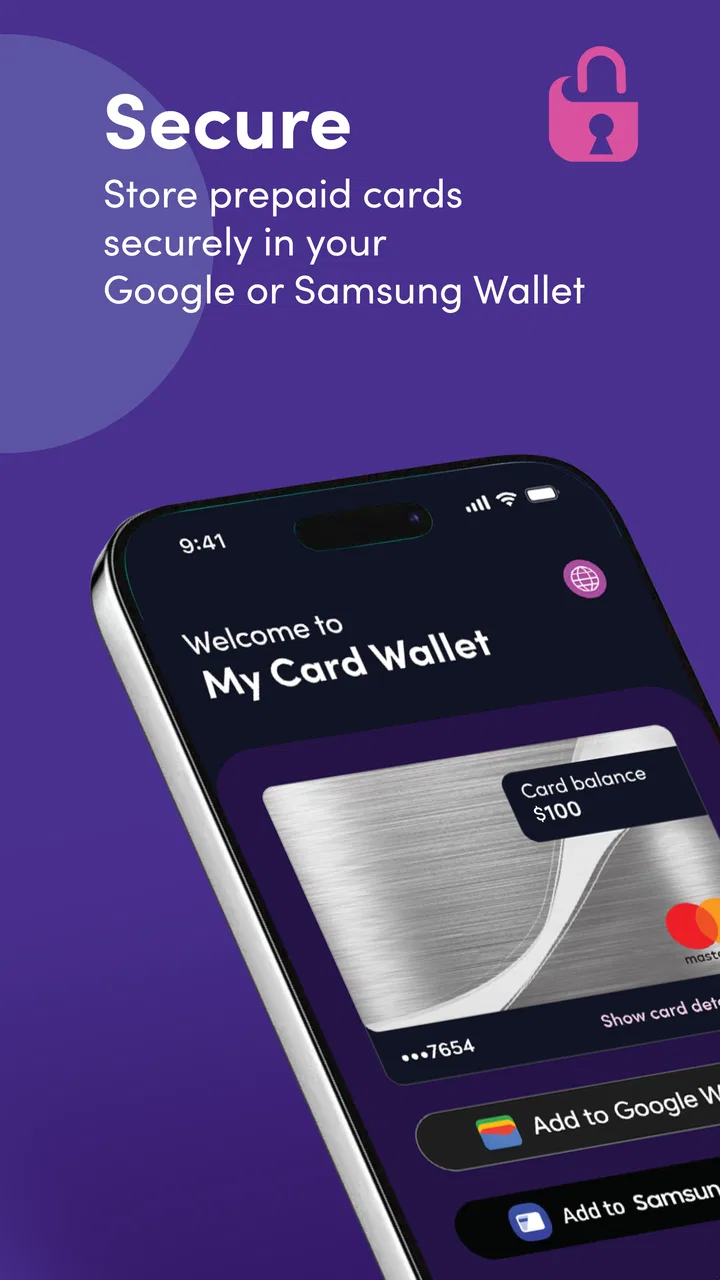
The Google Wallet and Samsung Wallet support is one of the more practical parts of the experience. If I prefer paying with my phone, adding an eligible prepaid card to a mobile wallet can be more convenient than carrying another piece of plastic. The important word is “eligible”: mobile-wallet support should be treated as a useful route for supported cards, not as a promise that every prepaid product will work in every situation.
What happens during a normal spending scenario
Imagine I receive a prepaid card before heading out to buy groceries. I can open My Card Wallet, manage the card, and try to add it to Google Wallet or Samsung Wallet before leaving. If that setup succeeds, the phone becomes the practical access point for the purchase. If I am saving the card for later, the app still gives me a dedicated place to return to instead of mixing the card with unrelated banking information.
That workflow is more useful than it may sound. Prepaid cards are often temporary, purpose-specific, or received by someone who does not want to combine them with a personal bank account. A dedicated card app respects that distinction. I would not use it as my main financial dashboard, but I can see myself opening it when the question is specifically, “What can I do with this prepaid card now?”
Speed expectations and the small delays that matter
For a focused app like this, I expect the opening experience and card-management screens to feel direct. There is no reason for me to want a long tour, a social feed, or a collection of unrelated finance tools. The value comes from reaching the relevant card and its wallet options without unnecessary wandering.
In practice, perceived speed is not only about how quickly an app launches. It also depends on whether I can recognize the right card immediately, understand what action is available, and complete that action without repeating steps. This is where a prepaid-card tool earns its place. If I have several cards, the clearest possible organization matters more than decorative design.
I would still avoid judging the whole experience by a single fast opening. Card-related actions can depend on the connection, the card itself, and the mobile-wallet service being used. A screen may appear quickly while an add-to-wallet request takes longer to finish. That is normal for an action involving another service, and it is different from the app itself being sluggish.
Heavy-use moments are about organization, not multitasking
My Card Wallet is not the sort of app I would leave open for hours, and I do not think it is meant for constant activity. Its busiest moments are likely to happen when I am managing more than one prepaid card, preparing several cards for use, or trying to complete a wallet setup while away from home.
That makes organization a more important performance question than raw processing power. If I am switching between cards, I want to confirm that I am working with the intended one before moving forward. A useful personal habit is to keep the physical card or its identifying details nearby during setup, particularly when several prepaid cards look similar. That reduces the risk of adding or checking the wrong card.
Another sensible workflow is to prepare a card before I reach the checkout. Mobile-wallet setup is not something I would postpone until a queue is waiting behind me. Doing it at home gives me time to resolve a card-specific issue, check that the card appears correctly, and decide whether I still need the physical card as a backup.
Reliability: a useful tool, but not the only fallback
The app’s long availability and strong average rating give me reasonable confidence in its general usefulness, but reliability for a finance tool means more than opening successfully. I also care about whether I can recover calmly when a card does not appear as expected, a wallet addition needs another attempt, or I am using a device with limited compatibility.
My advice is simple: do not make the app your only plan for an important payment until you have tested the card and wallet combination. Keep the physical card available when possible, especially for a first purchase. This is not a criticism unique to My Card Wallet; mobile payments involve the phone, the operating system, the wallet service, and the card issuer’s rules. A backup avoids turning a small setup problem into a failed purchase.
Recovery also benefits from patience. Repeatedly tapping the same action can make it harder to tell whether a request is still processing or whether it failed. I would wait for the result, note what the app shows, and then try again only when the state is clear. For prepaid cards, that careful approach is worthwhile because an unclear status can create unnecessary worry about whether a card was added or changed.
Device constraints you should consider first
The current release requires Android 11 or newer. That is the most important compatibility check for Android users: an older phone may not be able to install or update the app, regardless of how suitable the hardware feels for a simple finance utility.
This requirement also affects people who keep an older phone as a backup. A prepaid card may be perfectly usable in principle, but the backup device still needs a supported Android version if I plan to manage the card there. Checking the operating system before relying on that arrangement can save time.
The app’s mobile-wallet purpose also means that device compatibility is only one part of the picture. Google Wallet and Samsung Wallet have their own supported-device and account requirements, and a card may have its own eligibility conditions. I would therefore separate two questions: can the phone run My Card Wallet, and can the intended prepaid card be added to the mobile wallet I use? Passing the first test does not automatically answer the second.
For Samsung phone owners, Samsung Wallet may be the more natural destination; for people already using Google’s ecosystem, Google Wallet may fit better. The useful choice is not necessarily to install both. I would choose the wallet I already trust and use regularly, then keep My Card Wallet as the management starting point for the prepaid card.
Resource demands and the right expectations
This is a narrow finance app, so I would expect a lighter everyday role than a full banking suite packed with account feeds, investment charts, alerts, and document tools. That focused design is a strength for occasional prepaid-card tasks. I do not need a large financial dashboard when all I want is to manage one card or prepare it for mobile payment.
At the same time, “focused” does not mean I should ignore basic phone maintenance. Keeping Android updated, leaving enough storage for app updates, and using a stable connection are sensible habits for any wallet-related tool. If the phone is already struggling with many apps, the problem may be broader than My Card Wallet alone. I would look at the whole device before blaming this app for every delay.
A practical tip is to avoid doing card setup while the phone is in a low-power or unreliable network situation. Even when the app itself is responsive, a wallet-related request may need a dependable connection. Preparing the card before travel, shopping, or gifting it to someone else gives me a much better chance of spotting friction early.
Who will get the most from it
I think My Card Wallet is a good fit for people who use prepaid cards often enough to want a dedicated management point. It is also useful for someone who receives prepaid cards and prefers phone-based access instead of carrying every card. Families may appreciate the straightforward purpose when a card is intended for a particular spending role, although each person should still understand which card they are using and where it is accepted.
It can also suit users who want to move an eligible prepaid card into Google Wallet or Samsung Wallet. That is the strongest reason to choose it over simply keeping a card in a drawer. The app connects the prepaid-card task with the mobile-payment habit many people already have.
I would skip it if I do not use prepaid cards, if I need detailed budgeting across bank accounts, or if I expect a complete replacement for a bank’s finance app. Someone looking for spending categories, savings goals, transfers, or a broad view of personal finances would be better served by a dedicated banking or budgeting product. My Card Wallet has a narrower job, and that narrowness is both its appeal and its limitation.
How it compares with the usual alternatives
The most obvious alternative is using the prepaid card without a dedicated app. That can work for a single occasional purchase, particularly when I am comfortable carrying the physical card. However, it becomes less convenient when I have several cards or want mobile-wallet access. My Card Wallet offers a more organized route for those specific tasks.
Another alternative is managing the card through a general banking app. That may be better for someone whose prepaid product is already integrated into a wider financial relationship. The advantage of a bank app is breadth; the advantage here is focus. I would choose My Card Wallet when the prepaid card is separate from my main banking life and I do not want unrelated account information mixed into the same workflow.
Using Google Wallet or Samsung Wallet alone is also not quite the same experience. Those services are excellent destinations for mobile payments, but My Card Wallet is centered on prepaid-card management before or alongside that wallet step. I see them as complementary rather than direct substitutes: one helps manage the card, while the other is where I may use it from the phone.
Small habits that make the experience smoother
Before adding a card to a mobile wallet, I identify it carefully if I have more than one prepaid card. Similar-looking cards are an easy source of mistakes.
I prepare the card at home rather than waiting until checkout. That gives me time to use the physical card if the wallet setup does not go as planned.
I keep the phone’s Android version in mind, especially when using an older backup device. Android 11 is the minimum for the current release.
I treat the app as a prepaid-card tool, not as a complete financial record. For broader budgeting, I use a service designed around that purpose.
When a wallet action seems delayed, I check the result before tapping again. That makes recovery clearer and avoids creating confusion during setup.
My performance verdict
My Card Wallet succeeds because it keeps its purpose clear. I would choose it when I want a dedicated way to manage prepaid cards and prepare eligible ones for Google Wallet or Samsung Wallet. The free price removes an obvious barrier, and the broad Everyone rating makes the app approachable for the people most likely to need this kind of utility.
Its performance appeal is mainly practical: a focused app should make occasional card tasks easier than searching through several unrelated services. I would not expect it to replace a banking app, and I would not rely on it alone for a time-sensitive payment until I had tested the card, device, and chosen mobile wallet together.
Overall, I recommend it to prepaid-card users who want a clearer phone-based workflow, particularly those who manage multiple cards or prefer mobile payments. I would recommend a general banking or budgeting app instead for anyone seeking a complete picture of their money. The best reason to install My Card Wallet is not that it does everything; it is that it keeps one specific prepaid-card job pleasantly focused.
FAQs for My Card Wallet
01What is My Card Wallet and how does it work?
My Card Wallet is a digital wallet application designed to store your cards securely on your smartphone. It allows users to add various types of cards, including credit cards, loyalty cards, and membership cards, and access them with ease. The app uses encryption to ensure your data is protected, making it a convenient and safe alternative to carrying physical cards.
02Is My Card Wallet safe to use for storing sensitive information?
Yes, My Card Wallet employs advanced encryption and security protocols to safeguard your sensitive information. The app requires authentication, such as a PIN or biometric login, to access stored cards, ensuring only authorized users can view or use them. Regular updates help maintain security against potential threats.
03Can I use My Card Wallet for contactless payments?
Yes, My Card Wallet supports contactless payments for compatible cards. You can use your smartphone to make quick and secure payments at any terminal that accepts NFC transactions. Ensure your device has NFC capabilities and check that your specific card provider supports contactless payments through the app.
04What types of cards can I store in My Card Wallet?
My Card Wallet allows you to store a variety of card types, including credit and debit cards, loyalty and rewards cards, membership cards, and even some forms of identification. This flexibility helps users consolidate their wallet contents into one convenient, digital space, reducing the need to carry multiple physical cards.
05Are there any fees associated with using My Card Wallet?
My Card Wallet is generally free to download and use, but some advanced features or premium services may require a subscription or one-time purchase. It's important to review the app’s terms and conditions to understand any potential costs. Check for any in-app purchases that might enhance your user experience.
Pros
- Simple and intuitive user interface.
- Supports multiple card types securely.
- Quick access with biometric login.
- Offline access to stored card details.
- Customizable card organization features.
Cons
- Limited cloud backup options.
- No integration with payment apps.
- Occasional sync issues reported.
- Lacks advanced security settings.
- No support for international cards.

My Card Wallet
Gallery